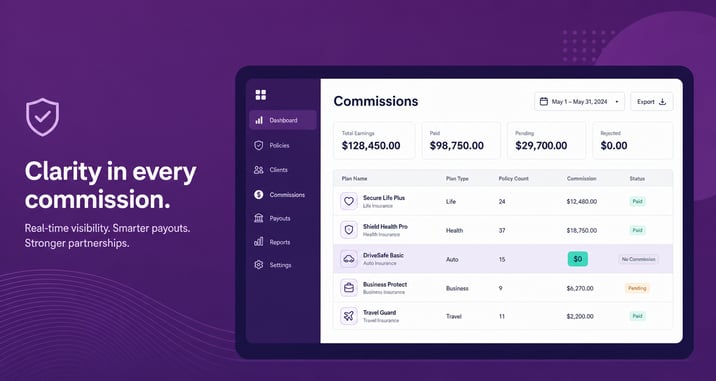
A $0 commission plan pays your agents nothing. For two years, carriers have quietly set commissions to zero on select Medicare plans to steer enrollments away from business they find unprofitable. Starting June 29, 2026, that practice becomes public. CMS is opening new reporting fields that flag which plans pay $0 commission, and the data goes live on cms.gov before AEP.
For agencies, this changes one thing: you can no longer treat every plan in your book as a paying plan. Here is what changed, the dates that matter, and what your commission system needs to do about it.
What Is a $0 Commission Plan?
A $0 commission plan is a Medicare Advantage or Part D plan that a carrier has chosen to pay no agent or broker commission on. The plan still sells. The client still enrolls. The agent earns nothing on it. Carriers use the tactic to reduce enrollment in plans they consider unprofitable, because fewer agents present a plan that pays them nothing.
What Changed for 2027
CMS added voluntary reporting fields to track per-plan compensation. Three dates drive the timeline:
- June 29, 2026. New voluntary CMS fields go live. Carriers can report per-plan compensation rates and flag plans paying $0 commission.
- July 31, 2026, 11:59 PM ET. Hard deadline. Carriers must submit all compensation data with executive attestation. No changes after this date.
- Before AEP. Carrier compensation data, including the $0 flags, becomes public on cms.gov.
CMS does not build reporting fields it does not plan to use. The agency flagged carriers that bury enrollment forms or hide plans from decision tools, and the new $0 reporting sits alongside those signals. Read this as the groundwork for future enforcement on plan steering.
Why This Matters to Your Agency
Most coverage frames $0 plans as an agent paycheck problem. The agency problem is different. It is a data problem.
When a plan pays nothing, your commission records still have to account for it. If your system assumes every enrolled policy generates a commission, a $0 plan creates a silent gap. An agent enrolls a client, expects to get paid, and the money never arrives. The agent calls you. You dig through carrier statements to find out the plan never paid in the first place. Multiply that by a downline and a full AEP.
Once the cms.gov data is public, your agents will ask which of their policies pay nothing. The agencies that can answer fast will look organized. The ones still reconciling by spreadsheet will look like they lost track of their own book.
What to Do Before AEP
- Pull the cms.gov data when it publishes. Cross-reference the $0 flags against the plans your agents actively sell.
- Record the per-plan rate in your commission system, including zero. A rate of $0 is still a rate. Your records should show it, not omit it.
- Flag $0 plans before payout, not after. Leadership and downline agents should see a zero-pay plan at enrollment, so nobody budgets for income that is not coming.
- Brief your agents. Give them the list of $0 plans in your book so they can decide how to handle those plans with clients, in line with their compliance obligations.
- Watch for mid-year changes. Carriers can adjust commissions at any time, even during AEP. A plan that pays today can go to $0 next month. Your system should absorb that change without a rebuild.
Where Agencies Get Stuck
Spreadsheets do not flag a missing commission. They show a blank cell, and a blank cell looks the same whether the plan pays $0 or the data has not loaded yet. That ambiguity is where payout disputes start.
Comissio records a per-plan rate for every policy, including a rate of zero, and flags it so leadership sees the gap before a commission run closes. Your agents see their own numbers in real time, including which plans pay nothing, so the questions stop landing on your desk during the busiest weeks of the year.
The $0 plan data is about to be public. The question is whether your commission system can tell the difference between a plan that pays nothing and a number you have not entered yet. See where your money actually goes.
.gif)